The world of artificial intelligence has become more accessible than ever, and one tool stands at the forefront of this revolution. If you’ve heard the buzz about AI-powered conversations but aren’t sure where to begin, you’re in the right place.
This guide will walk you through everything you need to know to get started with this transformative technology. Before reading this blog post, see our previous blog post about The Most Popular Blockchain Networks, which helps you introduce them.
What is ChatGPT?
ChatGPT is an advanced AI conversational assistant developed by OpenAI that can understand and respond to your questions in natural, human-like language.
Think of it as having a knowledgeable companion available 24/7 to help with writing, problem-solving, learning new topics, brainstorming ideas, and much more.
Whether you’re a student, professional, or simply curious about AI, this intelligent tool can become an invaluable part of your daily workflow.
Why Should You Care About This AI Tool?
The practical applications are virtually endless. Need help drafting an email? Want to understand a complex concept? Looking for creative inspiration?
This AI assistant handles it all with remarkable ease. Unlike traditional search engines that simply provide links, ChatGPT engages in dynamic conversations, understands context, and provides detailed, personalised responses tailored to your specific needs.
Getting Started: Your First Steps
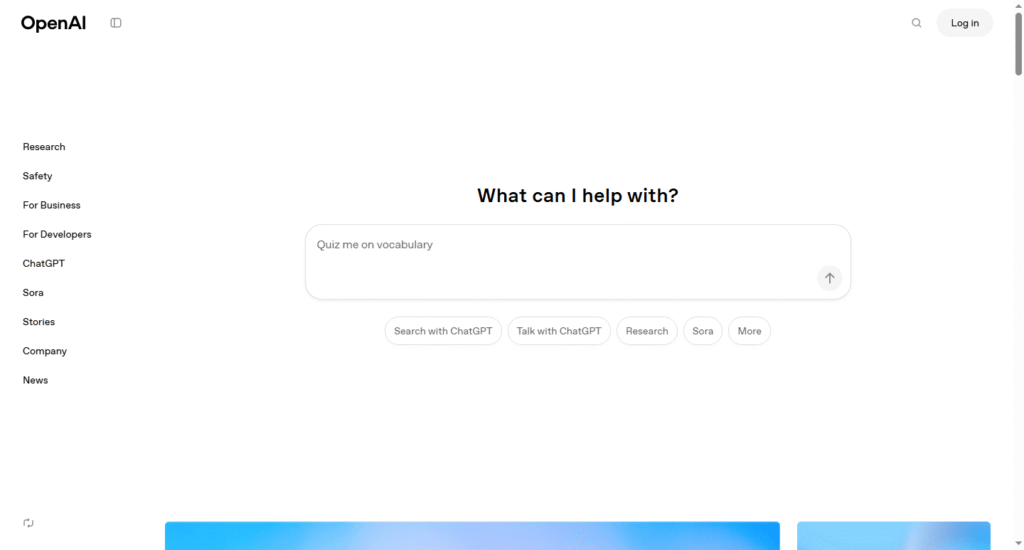
Starting your journey is refreshingly simple. Visit the OpenAI website and create a free account using your email address. Once you’re logged in, you’ll see a clean interface with a text box at the bottom.
That’s your gateway to AI-powered assistance. Type your question or request, hit enter, and watch as the AI generates a thoughtful response within seconds.
The beauty of this conversational AI lies in its versatility. You can ask straightforward questions, request explanations, seek advice on projects, or even engage in creative writing exercises. The more specific and clear your prompts, the better the responses you’ll receive.
Making the Most of Your AI Conversations
To get exceptional results from ChatGPT, think of your interactions as a dialogue rather than a simple query. Be specific about what you need.
Instead of asking “Tell me about marketing,” try “Explain three effective social media marketing strategies for small businesses.” This focused approach helps the AI understand exactly what you’re looking for.
Don’t hesitate to ask follow-up questions or request clarifications. The conversational nature means you can refine responses, ask for different perspectives, or drill down into specific details. If a response isn’t quite what you wanted, simply rephrase your question or provide additional context.
Practical Applications for Everyday Use
Students can leverage this intelligent assistant for research assistance, essay outlining, and explaining difficult concepts in simpler terms.
Content creators find it invaluable for brainstorming ideas, overcoming writer’s block, and generating first drafts. Business professionals use it for email composition, meeting summaries, and data analysis support.
Even in personal life, ChatGPT proves useful. Planning a trip? Ask for itinerary suggestions. Trying a new recipe? Request cooking tips and substitutions. Learning a new skill? Get step-by-step guidance tailored to your level.
Understanding the Limitations
While this AI assistant is remarkably capable, it’s important to recognise its boundaries. The system doesn’t have access to real-time information or personal data unless you provide it.
It can occasionally produce incorrect information, so fact-checking important details is always wise. Think of it as a highly knowledgeable assistant rather than an infallible oracle.
The technology works best as a collaborative tool. Use it to enhance your own knowledge and creativity, not replace your critical thinking. Review and refine the outputs to ensure they align with your specific needs and standards.
Tips for Success
Start with simple questions to get comfortable with how the platform works. Experiment with different types of requests to discover their full range of capabilities.
Save useful conversations for future reference. Most importantly, approach each interaction with curiosity and an open mind.
As you become more familiar with the tool, you’ll develop your own techniques for crafting effective prompts and getting exactly what you need. The learning curve is gentle, and the rewards are substantial.
Frequently Asked Questions
Is ChatGPT free to use?
Yes, there’s a free version available to everyone. Premium plans offer additional features and priority access during peak times.
Can I use it for work-related tasks?
Absolutely! Many professionals use this AI assistant for drafting documents, analysing data, brainstorming solutions, and improving productivity.
Is my conversation data private?
OpenAI has privacy policies in place, but avoid sharing sensitive personal information, passwords, or confidential business data in your conversations.
Can it write entire articles or assignments for me?
While it can generate content, it’s best used as a starting point or assistant. Always review, edit, and add your personal touch to ensure authenticity.
Does it replace human expertise?
No, it complements human knowledge and creativity. Think of it as a powerful tool that enhances your capabilities rather than replacing your unique insights.
What languages does it support?
The AI assistant can communicate in multiple languages, though English typically produces the most accurate results.
Ready to Transform Your Workflow?
The AI revolution isn’t coming; it’s already here, and ChatGPT makes it accessible to everyone.
Whether you’re looking to boost productivity, enhance creativity, or simply explore what artificial intelligence can do, now is the perfect time to start.
Don’t wait on the sidelines while others harness the power of AI. Head over to OpenAI’s website today, create your free account, and type your first question.
You’ll be amazed at what becomes possible when you have an intelligent assistant at your fingertips.